Showing posts with label Windows. Show all posts

Thursday, April 21, 2011

CD Writer Software

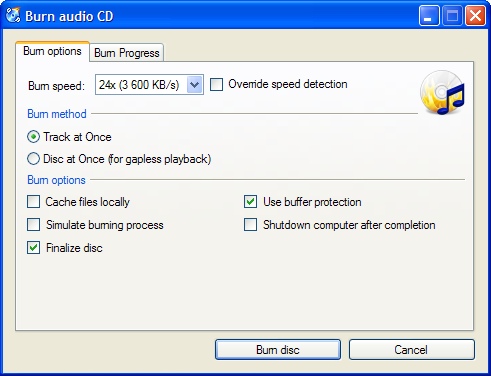
Screenshot
CDBurnerXP is a free application to burn CDs and DVDs, including Blu-Ray and HD-DVDs. It also includes the feature to burn and create ISOs, as well as a multilanguage interface. Everyone, even companies, can use it for free. It does not include adware or similar malicious components.

Key Features

  • burn all kinds of discs
  • audio-CDs with or without gaps between tracks
  • burn and create ISO files
  • data verification after burning process
  • create bootable discs
  • multi-language interface
  • bin/nrg → ISO converter, simple cover printing and much more!
  • Operating Systems: Windows 2000/XP/2003 Server/Vista/2008/Win7 (x86 / x64)

Download Here !!!!!!

Saturday, February 5, 2011

CCleaner

CCleaner is the number-one tool for cleaning your Windows PC. It protects your privacy online and makes your computer faster and more secure. Easy to use and a small, fast download.

Features


CCleaner is our system optimization, privacy and cleaning tool. It removes unused files from your system - allowing Windows to run faster and freeing up valuable hard disk space. It also cleans traces of your online activities such as your Internet history. Additionally it contains a fully featured registry cleaner. But the best part is that it's fast (normally taking less than a second to run) and contains NO Spyware or Adware!


Cleans the following:

Internet Explorer Internet Explorer
Temporary files, history, cookies, Autocomplete form history, index.dat.

Firefox Firefox
Temporary files, history, cookies, download history, form history.

Google Chrome Google Chrome
Temporary files, history, cookies, download history, form history.

Opera Opera
Temporary files, history, cookies.

Apple Safari Safari
Temporary files, history, cookies, form history.

Windows Windows
Recycle Bin, Recent Documents, Temporary files and Log files.

Registry Registry Cleaner
Advanced features to remove unused and old entries, including File Extensions, ActiveX Controls, ClassIDs, ProgIDs, Uninstallers, Shared DLLs, Fonts, Help Files, Application Paths, Icons, Invalid Shortcuts and more... also comes with a comprehensive backup feature.

Applications Third-party applications
Removes temp files and recent file lists (MRUs) from many apps including Media Player, eMule, Google Toolbar, Netscape, Microsoft Office, Nero, Adobe Acrobat, WinRAR, WinAce, WinZip and many more...

Safe 100% Spyware FREE
This software does NOT contain any Spyware, Adware or Viruses.


Thursday, February 3, 2011

IrfanView

IrfanView is a very fast, small, compact and innovative FREEWARE (for non-commercial use) graphic viewer for Windows 9x, ME, NT, 2000, XP, 2003 , 2008, Vista, Windows 7. 

Some IrfanView features:
  • Many supported file formats 
  • Multi language support
  • Thumbnail/preview option
  • Paint option - to draw lines, circles, arrows, straighten image etc.
  • Toolbar skins option
  • Slideshow (save slideshow as EXE/SCR or burn it to CD)
  • Show EXIF/IPTC/Comment text in Slideshow/Fullscreen etc.
  • Support for Adobe Photoshop Filters
  • Fast directory view (moving through directory)
  • Batch conversion (with image processing)
  • Multipage TIF editing
  • File search
  • Email option
  • Multimedia player
  • Print option
  • Support for embedded color profiles in JPG/TIF
  • Change color depth
  • Scan (batch scan) support
  • Cut/crop
  • IPTC editing
  • Effects (Sharpen, Blur, Adobe 8BF, Filter Factory, Filters Unlimited, etc.)
  • Screen Capturing
  • Extract icons from EXE/DLL/ICLs
  • Lossless JPG rotation
  • Unicode support
  • Many hotkeys
  • Many command line options
  • Many PlugIns
  • Only one EXE-File, no DLLs, no Shareware messages like "I Agree" or "Evaluation expired"
  • No registry changes without user action/permission!
  • and much much more
CLICK HERE 2 DOWNLOAD !!!

Google Chrome

A browser that combines a minimal design with sophisticated technology to make the web faster, safer, and easier

One box for everything
Type in the address bar and get suggestions for both search and web pages.

Thumbnails of your top sites
Access your favorite pages instantly with lightning speed from any new tab.

Shortcuts for your apps
Get desktop shortcuts to launch your favorite
web applications easily and quickly.


So today we're releasing the beta version of a new open source browser: Google Chrome.


On the surface, we designed a browser window that is streamlined and simple. To most people, it isn't the browser that matters. It's only a tool to run the important stuff - the pages, sites and applications that make up the web. Like the classic Google homepage, Google Chrome is clean and fast. It gets out of your way and gets you where you want to go.

MS Ofice 2010

Express your ideas more visually.

Office 2010 opens up a world of design options to help you express your ideas with more impact. New and improved picture formatting tools, such as color saturation and artistic effects, let you transform your visuals into works of art. And a wide range of new customizable themes and SmartArt® graphic layouts offer more ways to make your ideas stick.

Accomplish more when working together.

Brainstorm ideas, keep versions in sync, and meet deadlines faster when you’re working in groups. Co-authoring in Word 2010, PowerPoint 2010, Excel Web App, and OneNote 2010 shared notebooks enable you to edit the same file at the same time with other people — even when they’re in different locations.

Get your message out instantly.

Broadcast your PowerPoint presentation to a remote audience, whether or not they have PowerPoint installed.4 The new PowerPoint Broadcast Slide Show feature enables you to present right from your desk, while your audience views the presentation live in their Web browser.


Saturday, January 22, 2011

Wamp Server for PHP


OR


WAMP (Windows, Apache, MySQL, PHP/Perl/Python)
WAMP is a form of mini-server that can run on almost any Windows Operating System. WAMP includes Apache 2, PHP 5 (SMTP ports are disabled), and MySQL (phpMyAdmin and SQLitemanager are installed to manage your databases) preinstalled.

An icon on the taskbar tray displays the status of WAMP, letting you know if; a) WAMP is running but no services are opened (the icon will appear red), b) WAMP is running and one service is opened (the icon will appear yellow) or c) WAMP is running with all services opened (the icon will appear white). Apache and MySQL are considered to be services (they can be disabled by left-clicking on the taskbar icon, guiding your cursor over the service you wish to disable and selecting "Stop Service").

The files/web pages that are hosted on your WAMP server can be accessed by typing http:/localhost or http://127.0.0.1/ in the address bar of your web browser. WAMP must be running in order to access either of the above addresses.


Apache 2.2.17
Php 5.3.5
Mysql 5.5.8
PhpMyadmin 3.2.0.1
SQLBuddy 1.3.2
XDebug 2.1.0-5.3
webGrind 1.0
XDC 1.5

Tuesday, January 11, 2011

Virtual Box For Virtual LInux Install

Click Here to Download Software

VirtualBox is a general-purpose full virtualizer for x86 hardware. Targeted at server, desktop and embedded use, it is now the only professional-quality virtualization solution that is also Open Source Software.


Some of the features of VirtualBox are:
  • Modularity. VirtualBox has an extremely modular design with well-defined internal programming interfaces and a client/server design. This makes it easy to control it from several interfaces at once: for example, you can start a virtual machine in a typical virtual machine GUI and then control that machine from the command line, or possibly remotely. VirtualBox also comes with a full Software Development Kit: even though it is Open Source Software, you don't have to hack the source to write a new interface for VirtualBox.
  • Virtual machine descriptions in XML. The configuration settings of virtual machines are stored entirely in XML and are independent of the local machines. Virtual machine definitions can therefore easily be ported to other computers.
  • Guest Additions for Windows, Linux and Solaris. VirtualBox has special software that can be installed inside Windows, Linux and Solaris virtual machines to improve performance and make integration much more seamless. Among the features provided by these Guest Additions are mouse pointer integration and arbitrary screen solutions (e.g. by resizing the guest window). There are also guest additions for OS/2 with somewhat reduced functionality.
  • Shared folders. Like many other virtualization solutions, for easy data exchange between hosts and guests, VirtualBox allows for declaring certain host directories as "shared folders", which can then be accessed from within virtual machines.


Click Here to Download Software

Click Here for User Manual 

Monday, January 10, 2011

DeskScapes

Bring your wallpaper to life with DeskScapes!

DeskScapes is a program that allows users to have animated wallpaper on their Windows 7, Vista or XP desktop. It supports playing video as animated wallpaper, dynamically generated content as animated wallpaper, and more. Users also have the ability to change specific colors in their current wallpaper or choose the "Random wallpaper option", and set how often the wallpapers will rotate. 


Animate:


Animate your Windows desktop


DeskScapes supports the use of dream files, WMV and MPEG videos for animations. The .Dream format. is supported by DeskScapes and has been specifically designed to contain content intended to be used as animated wallpaper. Choose between subtle or extreme animated wallpapers.


Supports Hybrid dreams


Hybrid dreams allow you to take static wallpapers and apply animations to them. This gives people a chance to create animated wallpapers without having to know how to use 3D applications. It’s really easy to create subtle animations without having to render a huge video file, and it uses very little resources. Simply create your hybrid dream, save it in the .Dream format and apply it to your desktop using DeskScapes.


Create

Easy-to-use configuration dialog
The configuration dialog is easy-to-use with its slider bar and tabbed sections at the bottom. A large preview area above helps you see what your desktop will look like before applying your new wallpaper. There are small thumbnails that also give a nice preview of what the effect will look like on your particular wallpaper. 

Stylize

Add cool effects to your wallpaper
Choose from over 40 effects to apply to a new or existing Windows wallpaper. Some effects include: black and white, blur, canvas texture, inverted, night vision, pop art, sepia, animated snow and much more! View Demo.


Window Blinds 7

Customize your Windows® experience with WindowBlinds

You’re a unique individual with your own personal style - so why does your desktop look the same as everyone else’s? Choose from thousands of themes, change their colors, add textures, wallpapers, even start from the default Windows Aero theme if you wish !!!


Watch this video to learn more.......!!

And 


Fences Software - Must Download and Enjoy !!!!

Fences is a software utility for Windows that helps to organize icons on the desktop. It is developed by Stardock and distributed as part of their Object Desktop suite. A freeware version is available. 


Functionality

Fences defines translucent areas on the desktop that contain groups of icons. These fences can be individually created, named, moved, and re-sized — they will also display a scroll bar if necessary.
Double-clicking on the desktop hides all non-excluded fences and icons, while another double-click causes them to reappear. Snapshots can restore fences to a particular configuration after use.


spread firefox affiliate button